
Last May, I was sitting at my desk staring at the Google Ad Manager dashboard for Profit Shield AI, and I felt physically sick.
Tomas and I were in the middle of a massive technical audit. We were trying to secure our administrator permissions and lock down our account health.
But we had a glaring, massive problem staring us in the face. Our IVT (Invalid Traffic) metrics were spiking dangerously high. We were perilously close to violating our Master Service Agreements (MA).
We had launched a new, highly targeted campaign the night before. I set a daily budget of $500, expecting to wake up to a solid pipeline of qualified leads.
Instead, I woke up to a drained budget, 200 clicks, and exactly zero conversions.
My first instinct was to blame myself. Was the landing page broken? Did the organic traffic funnel break? Were the hooks not aggressive enough?
After digging into the server logs, the truth became terrifyingly clear. We weren’t failing. We were under siege.
Those 200 clicks were real, but the “people” behind them were not. They were automated scripts and malicious actors designed to bleed our daily budget dry before a real, human customer ever saw our ads.
If you are running paid ads and wondering why your cost-per-acquisition is soaring while sales remain flat, you are likely paying a massive “Bot Tax.”
Here is how I finally stopped the bleeding, satisfied the ad networks, and used data to lock down our traffic.
Phase 1: The “Ghost” Clickers (Who is Draining Your Budget?)
Before we can fight the enemy, we have to know what it looks like.
When marketers talk about “bot traffic,” they usually picture a generic spam robot. The reality is much more sophisticated. It usually falls into three highly destructive categories.
1. The Scraper Bots
These aren’t even trying to click your ads maliciously; they are just aggressive. Scrapers are automated Python or Node.js scripts built to crawl the internet looking for pricing data or content to steal. They click your search ads simply because it’s the fastest way to find your active landing pages. You pay $5 for a click, and the bot leaves 0.1 seconds later with a copy of your pricing table.
2. The “Click Farm” Mercenaries
This is organized digital sabotage. Competitors or malicious networks hire actual humans (or deploy advanced botnets) to intentionally click your ads on your most expensive keywords. If they drain your $500 daily budget by 10:00 AM, your ads turn off. For the rest of the day, their ads show up at the top of Google for much cheaper.
3. The Vindictive Competitor
Never underestimate human pettiness. This is the rival business owner who manually clicks your sponsored ad every single morning while drinking his coffee, knowing it costs you $15 a pop.
If you want to understand exactly how the ad networks view this activity, watch this official breakdown from the Google AdSense team explaining how invalid traffic algorithms detect and penalize artificial clicks.
Phase 2: Diagnosing the Footprints in GA4
You don’t need to be a data scientist to prove you are being robbed. You just need to know exactly where to look.
When Tomas and I were fighting our IVT issues, we practically lived inside Google Analytics 4 (GA4). Open your GA4 dashboard and look for these specific “Ghost Signals”:
- The 0-Second Session: Go to your Traffic Acquisition report. Look at the “Average Engagement Time.” Real humans read hooks, scroll, and hesitate. Bots do not. If your engagement time for a campaign is
0m 00s, no human eyes ever saw that page. - The 100% Bounce Rate: If a specific ad group has a 98% to 100% bounce rate over hundreds of clicks, it is not a bad landing page. It is a synthetic traffic source.
- The Data Center Anomaly: Look at the geographic location of your visitors. If you are targeting local businesses in Chicago, why do you have 85 clicks coming from a server farm in Ashburn, Virginia? Humans live in houses; bots live in data centers.

To truly understand how deeply this impacts your unit economics, you have to look at the math. The true cost of your Customer Acquisition (CPA) shifts violently when you factor in IVT.
{True CPA} = {Total Ad Spend}} \ {Total Conversions} x (1 – IVT Rate
Use this calculator to see exactly how much of your daily budget is evaporating into the Bot Tax.
The “Bot Tax” IVT Calculator
Adjust the sliders below to see exactly how much of your ad spend is evaporating into invalid traffic.
Daily Bot Tax
Monthly Revenue Leak
Phase 3: The AI Shield (Behavioral Fingerprinting vs. IP Blocking)
When I first tried to fix this, I did it manually. I would find a bad IP address in my logs, log into Google Ads, and add it to the exclusion list.
It was a complete waste of time.
By the time I blocked one IP, the botnet had already rotated through 50 new ones. You cannot fight a machine-speed attack with human-speed reflexes. You need an AI standing at the front door.
Modern fraud protection tools (like ClickCease, TrafficGuard, or Cloudflare Enterprise) do not just look at IP addresses anymore. They use Behavioral Fingerprinting.
How the AI Actually Catches Them

- The Mouse Trajectory: Humans are messy. We move our mice in slight curves, overshoot buttons, and scroll at variable speeds. A bot moves a cursor in a mathematically perfect straight line.
- The “Invisible” Trap: AI tools inject invisible fields (honeypots) into your forms. A human can’t see them, so they leave them blank. A bot reads the raw HTML and fills out every single field instantly.
The moment the AI detects this non-human behavior, it takes the device’s unique fingerprint and automatically injects it into your Google Ads exclusion list via an API. The next time that bot searches for your keyword, your ad simply doesn’t exist for them.
Phase 4: The Developer Route (My Quick VS Code Audit)
Sometimes I don’t want to wait for a third-party dashboard to update. I like to get my hands dirty.
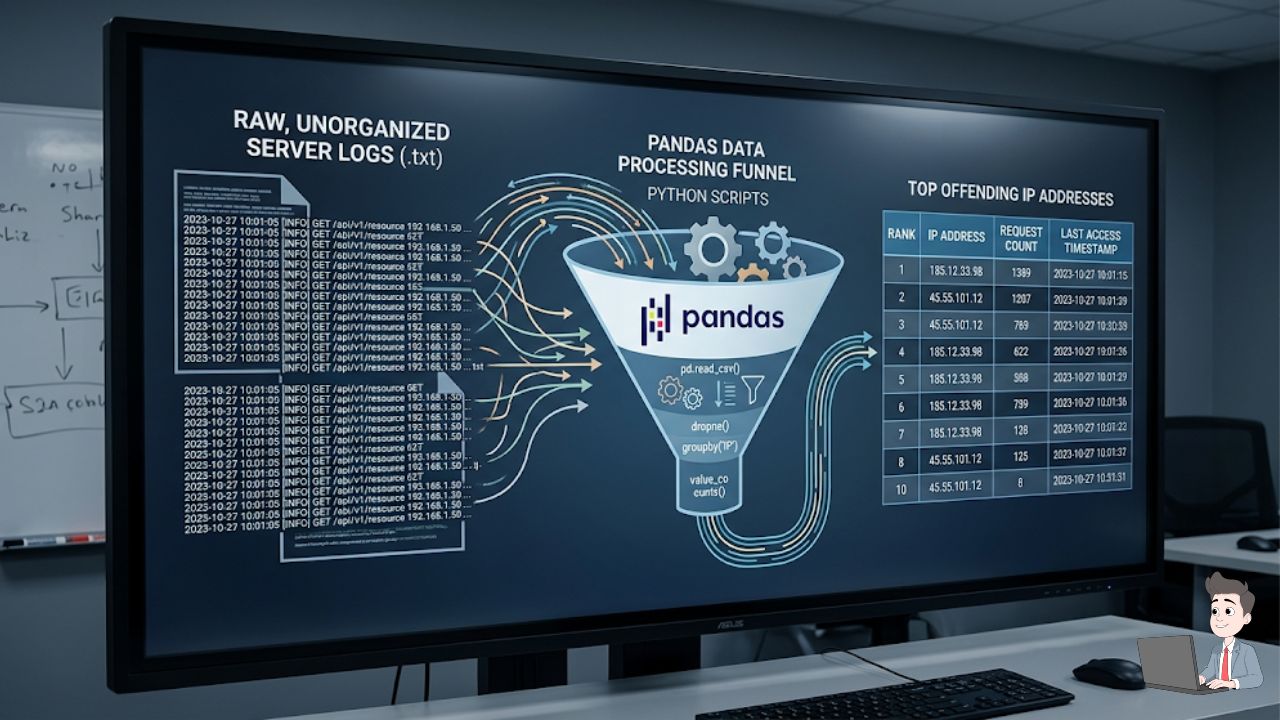
I keep a simple Python script in VS Code that I run against my raw server access logs to instantly spot aggressive IPs. If you are comfortable scripting, you can use the pandas library to load your raw server logs, group the requests, and sort by frequency.
Here is the core logic I use to isolate the offenders:
Python
import pandas as pd

# Load your raw server access logs into a DataFrame
# Assuming standard Apache/Nginx log format
logs = pd.read_csv('access_logs.txt', sep='\s+', header=None, engine='python')

# Isolate the IP addresses (usually the first column)
ip_addresses = logs[0]

# Count frequency of requests per IP
ip_counts = ip_addresses.value_counts().reset_index()
ip_counts.columns = ['IP_Address', 'Request_Count']

# Filter for aggressive anomalies (e.g., more than 500 requests)
malicious_ips = ip_counts[ip_counts['Request_Count'] > 500]

print("Aggressive IPs detected:")
print(malicious_ips)
If you see an IP hitting your site 500 times in two minutes, grab that IP and manually ban it at the server level via your .htaccess file or server firewall. It’s a dirty fix, but it works in an emergency.
Phase 5: The “Bootstrap” Defenses (Stop the Bleeding Today)
If you don’t have the budget to buy dedicated click-fraud software today, you can change these three settings in your Google Ads account right now to block 40% of the junk.
1. Turn Off the Display Network
If you are running Search Ads, uncheck the box that says “Include Google Display Network.” A massive portion of click fraud happens on low-quality third-party mobile apps and spam blogs that exist purely to host ads.
2. Turn Off Search Partners
Google extends your ads to “partner” search engines. These are highly susceptible to bot traffic. Stick strictly to the main Google Search results page.
3. Strict Geo-Targeting
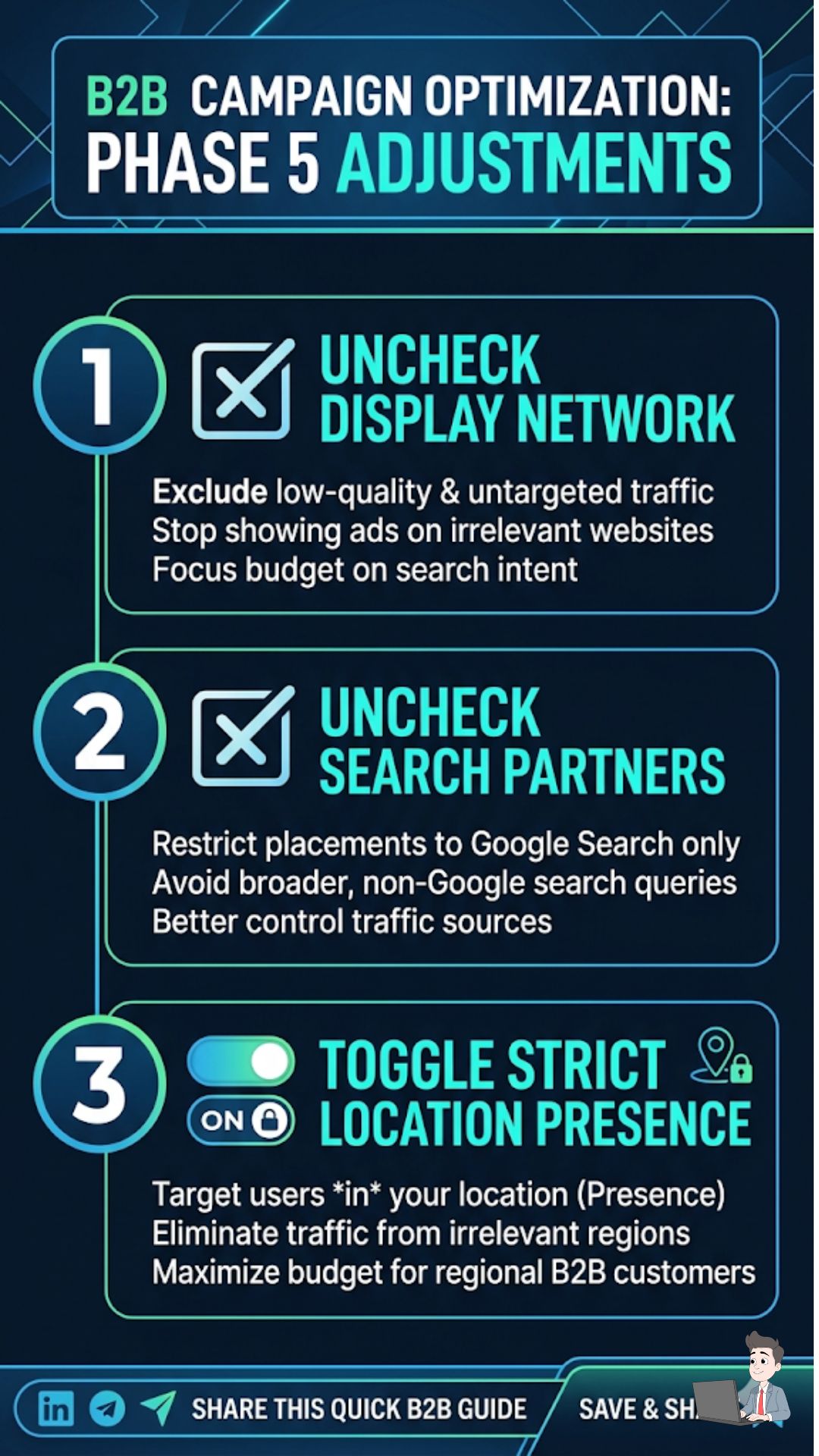
Do not select “People in, or who show interest in, your targeted locations.”
Select “People in or regularly in your targeted locations.”
This stops a bot in an overseas data center from clicking your ad just because they added “Chicago” to their search query string.
The Bottom Line: Reclaim Your Territory
The internet is noisy, and not everyone knocking on your door has good intentions. When you are pouring your hard-earned cash into a daily ad budget, you have to defend it ruthlessly.
Stop accepting “wasted spend” as the normal cost of doing business.
It isn’t normal to have a 100% bounce rate. It isn’t a “market fluctuation” when $500 vanishes in an hour with zero conversions.
Get inside your analytics today. Look at the engagement times. Turn off the partner networks. If you are spending serious money, hook up a behavioral AI shield. The moment you lock out the bots, you will be amazed at how fast your cost-per-lead drops and your actual, human sales begin to climb.
Operational Disclaimer: This article is for educational and informational purposes only. When modifying server .htaccess files or firewall settings, ensure you have active backups, as incorrect configurations can take your website offline. For persistent DDoD or IVT attacks, consult with a certified cybersecurity professional or your cloud infrastructure provider.