
I remember the day I almost lost a five-figure contract because of a single, misplaced trailing space in an Excel sheet.
I was running a massive outreach campaign at Profit Shield AI. On paper, I was “data rich.” I had a CRM packed with 15,000 leads. I felt like a genius—until I actually looked at the results. My best sales rep, Sarah, spent an entire Monday morning dialing numbers.
Out of her first 20 calls, 12 were disconnected, 5 reached the wrong person entirely, and 3 were duplicates of people we’d already spoken to months prior. She spent four hours to have exactly one real conversation.
I was paying for a top-tier CRM, but I’d let it turn into a digital graveyard. I was suffering from what the industry calls CRM Rot.
The 2026 Data Decay Reality
If you think your database is “fine,” think again. In 2026, B2B contact data decays at a staggering rate of roughly 70% per year. People aren’t just changing jobs; they are changing industries, companies are folding overnight, and email servers are getting more aggressive with their filters by the hour.
If you aren’t cleaning your data, you aren’t just wasting time—you are actively destroying your email sender reputation.
Phase 1: The “AI Janitor” (Mechanism of Action)
In the old days, “cleaning data” meant hiring interns to stare at spreadsheets. Today, AI-driven Data Governance tools use three core mechanisms to do a month’s worth of work in seconds.
1. Fuzzy Logic Deduplication
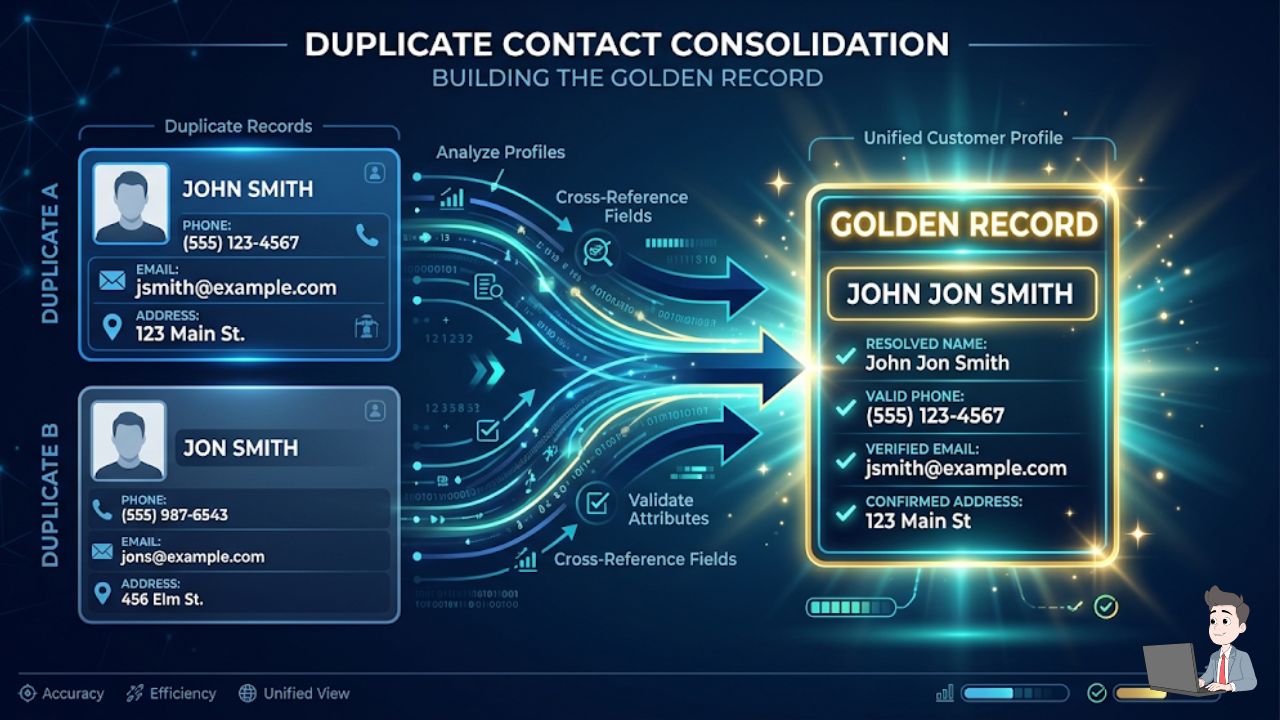
Standard software looks for exact matches. If you have “John Smith at Google” and “Jon Smith at Google Inc.,” a normal system sees two different people.
Modern AI uses Fuzzy Logic. It calculates a $Similarity Score$ based on string distance algorithms (like Levenshtein or Jaro-Winkler). It looks at context—the phone number, LinkedIn URL, and company domain—and realizes there is a 96% probability these are the same human. It then merges them into a single “Golden Record.”
2. The “Silent SMTP Handshake”
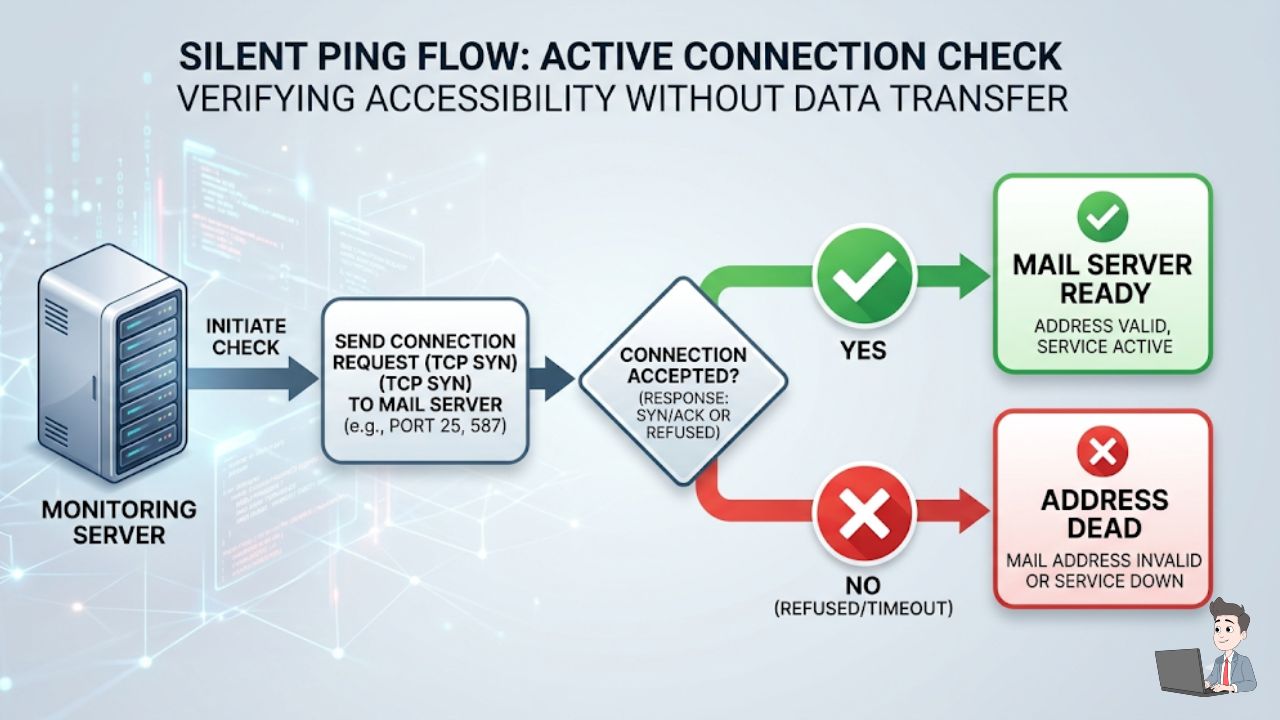
This is critical for protecting your domain’s health. AI verification tools perform a silent “ping” to the recipient’s mail server. They don’t actually send an email, but the server responds with either “User Unknown” or “Ready.” This allows you to tag “Dead” addresses before you ever hit send, keeping your bounce rate under the 1% threshold required by major ISPs.
Phase 2: The 2026 Tool Shed
Depending on whether you are a solopreneur or running a high-volume agency, your needs will differ.
| Business Size | Recommended Tool | Core AI Feature |
| Enterprise | DemandTools | Complex merge logic for Salesforce Power Users. |
| SMB | Insycle | Automated “Recipes” that clean data every night at 2 AM. |
| Budget | Zoho DataPrep | Visual data pipeline to fix messy lists before import. |
| Developer | OpenRefine | Open-source, local-run tool for maximum data privacy. |
Phase 3: The DIY Developer Corner (Python)
If you have a “dirty” CSV and want to sanitize it without a new subscription, I’ve refined a Python script that handles the most common “rot” issues. I frequently use a variation of this to prep lists before they hit our automation engines.
Python
import pandas as pd

# 1. Load the file from your downloads
df = pd.read_csv('messy_leads.csv')

# 2. Deduplication using Fuzzy-lite logic (Email focus)
df = df.drop_duplicates(subset=['Email'], keep='first')

# 3. Normalization: Formatting First Names & lowercasing Emails
df['First Name'] = df['First Name'].str.title().str.strip()
df['Email'] = df['Email'].str.lower().str.strip()

# 4. Handling 'Null' values to prevent "[NULL]" email errors
df['Company'] = df['Company'].fillna('Independent')

# 5. Exporting the 'Golden' list
df.to_csv('clean_leads_2026.csv', index=False)
The “Trim” Trick: Trailing spaces (e.g., "mike@gmail.com ") are the #1 reason CRMs fail to recognize duplicates. The .strip() function in the script above is the most valuable line of code for your deliverability.
If you have never run a Python script before, watch this excellent, step-by-step breakdown by a former AWS Data Analyst. He shows you exactly how to load a messy CSV and use the Pandas library to strip out the “CRM Rot” in real-time.
![A sharp, dark-mode screenshot of a modern code editor (like VS Code) displaying the Pandas Python script. Add a subtle, professional highlight over the df['Email'].str.lower().str.strip() line to emphasize the "Trim Trick" mentioned in the text.](https://profitshieldai.com/wp-content/uploads/2026/02/Orange-Modern-Minimal-Blog-Writing-YouTube-Thumbnail-79.jpg "Orange Modern Minimal Blog Writing YouTube Thumbnail (79)")
Phase 4: Solving Real Pain Points (FAQ)
Q: I have 5,000 leads from 2022. Should I just delete them?
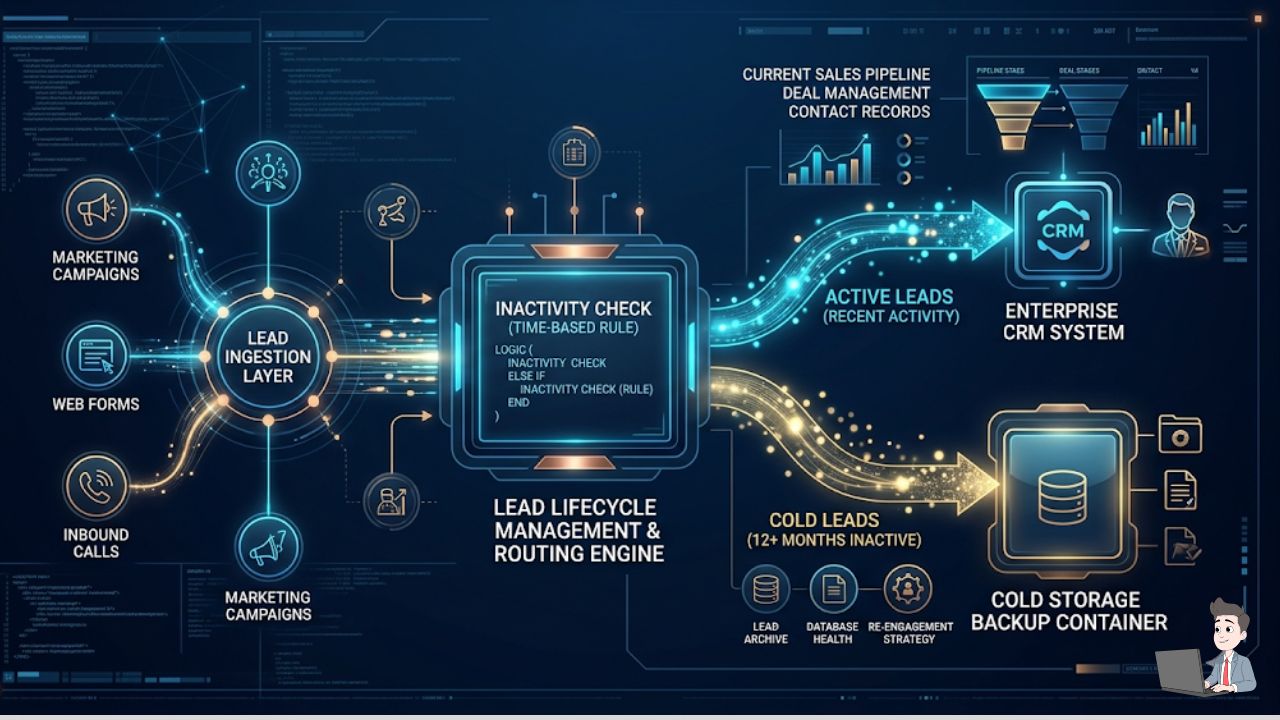
A: Use a Sunset Policy. If they haven’t opened an email in 12 months, move them to “Cold Storage” (like a cheap AWS S3 bucket). This saves you money on CRM licensing fees while keeping the data for audit purposes.
Q: How do I handle a “Right to be Forgotten” request?
A: Under GDPR/CCPA, simply hitting “delete” isn’t enough. You must ensure the data is purged from your backups. Use a File Shredder tool that overwrites the sectors of the hard drive if the data is stored locally, or use your CRM’s “Permanent Purge” API.
Q: My team hates the “Big Brother” feel of data monitoring. Help?
A: Reframe it. Don’t tell them you’re watching their work; tell them you’re removing the friction that keeps them from hitting their commission. Nobody likes calling disconnected numbers.
The Bottom Line
Your CRM is the heart of your business revenue. If the heart is pumping “dirty” data, the whole organism slows down. Take an hour this weekend. Run a Similarity Score check on your top 1,000 leads. See how many “zombie” emails are lurking in there.
By the time your “Sarah” logs in on Monday, she won’t be wasting time on ghosts—she’ll be closing deals.
And once your team is firing on all cylinders with clean data, make sure you’re hiring the right humans to handle that growth. Check out my guide on Detecting the “Deepfake Candidate” to ensure your next remote hire is as real as your new, clean data.
Data Disclaimer: This article is for educational purposes. Managing personal data involves strict legal requirements (GDPR, CCPA, etc.). Always consult with a data privacy officer before implementing automated deletion or enrichment scripts on live customer data.
About the Author:
Olivia is a digital entrepreneur and the founder of Profit Shield AI. She specializes in Python-based automation and data governance, helping businesses turn messy databases into high-conversion revenue engines.