
I’ll never forget the sinking feeling I had last tax season. I was sitting at my desk, running a financial automation script on my year-end business bank statements, when my terminal threw an anomaly for a recurring $19.99 charge from a company I didn’t even recognize.
I dug into the archives. Three years earlier, I was sitting in an airport terminal and desperately needed to edit a PDF contract before a flight. I found a random web tool, signed up for their “7-Day Free Trial,” entered my credit card, and sent the document. I told myself, “I’ll cancel this the second I land.”
I didn’t cancel it. Life happened. And for three entire years, that PDF tool quietly siphoned roughly $720 out of the Profit Shield AI operating account. I used it exactly once.
In the tech industry, we call this a “Zombie App.” It’s dead to you—you don’t use it, you don’t need it, and you probably forgot the password—but it keeps walking around, eating your bank balance every single month.
If you are trying to optimize your budget in 2026, the biggest leak isn’t office supplies or coffee. It is unchecked, unused Software as a Service (SaaS) subscriptions. Here is my hands-on, highly practical guide to performing a “Zombie Audit” so you can find these financial parasites, kill them, and put that cash back where it belongs.
Phase 1: The “Shadow IT” and Ghost Seat Problem
Before you can fix the leak, you have to understand why it happens. In the business world, this phenomenon is called SaaS Sprawl, and it is quietly bankrupting modern teams. According to recent 2026 metrics, up to 50% of enterprise SaaS licenses go completely unused, wasting billions annually.
There are usually two main culprits:
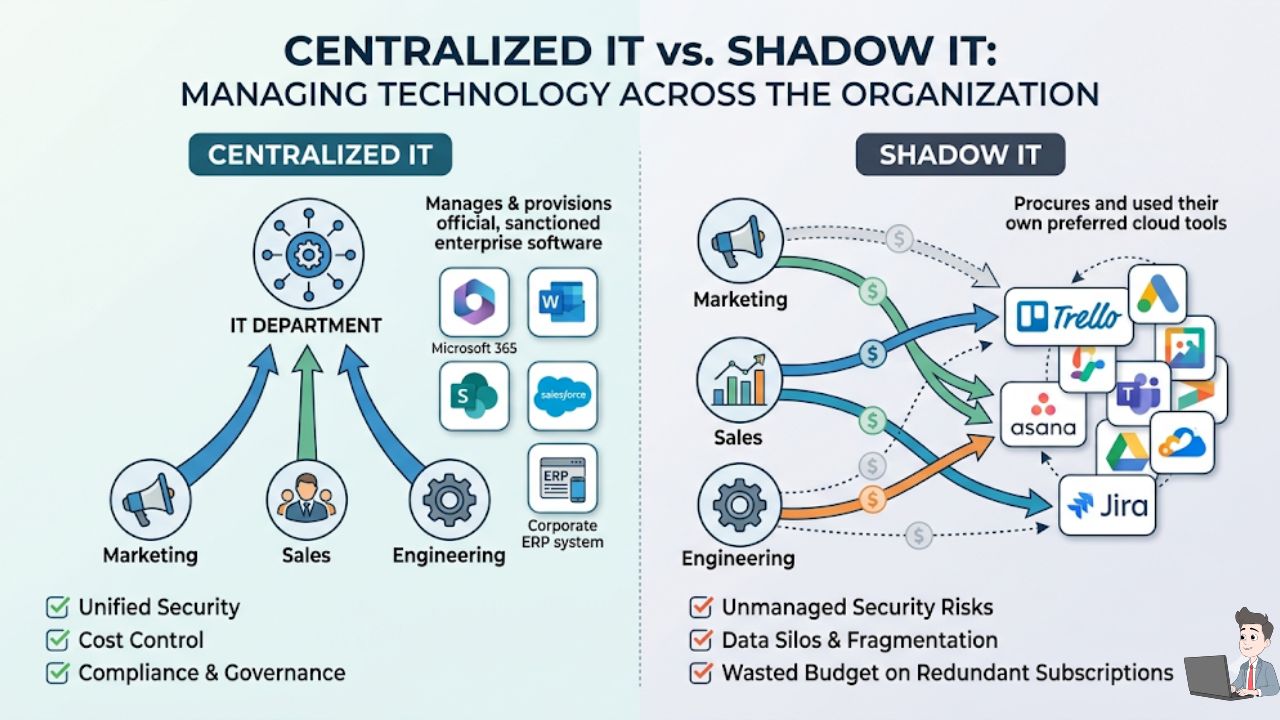
1. The “Shadow IT” Leak
This happens when employees buy software on a corporate card without telling anyone. Your marketing team gets frustrated with the current project manager and buys seats for Trello. The engineering team is paying for Jira, and you are still paying for the company-wide Asana account. You are paying three times for the exact same functionality because of decentralized purchasing.
2. The “Ghost Seat”
This is the silent killer. You buy a block of 50 seats for Slack or Salesforce because you plan to grow. But right now, you only have 35 active employees. Or, worse, an employee leaves the company, you revoke their email access, but you forget to manually delete their paid “seat” inside the software. You end up paying for “Ghosts” every single month.
The Golden Rule: If a software tool hasn’t been logged into by a user for 90 days, that is wasted capital. Period.
Phase 2: The Automated Saturday Morning Audit
If you are a solopreneur, a freelancer, or running a small agency, you don’t need a massive enterprise software suite to fix this. You just need a bit of data processing.
Step 1: The Python “CSV Scrub”
Here is the biggest mistake people make: they delete an app from their iPhone and think they cancelled the subscription. Deleting an app does nothing to stop the billing on the backend.
Instead of staring at spreadsheets for hours, I use a quick Python script with the pandas library to instantly isolate recurring charges from a standard bank CSV export.
![A professional screenshot of a modern code editor (like VS Code) displaying the Python Pandas script you provided in the article. Add a subtle, branded highlight over the df[df['Description'].str.contains(...)] line.](https://profitshieldai.com/wp-content/uploads/2026/02/Orange-Modern-Minimal-Blog-Writing-YouTube-Thumbnail-2026-05-16T160302.248.jpg "Orange Modern Minimal Blog Writing YouTube Thumbnail - 2026-05-16T160302.248")
Python
import pandas as pd

# Load your last 90 days of transactions
df = pd.read_csv('business_transactions_90_days.csv')

# Filter for common SaaS indicators and recurring patterns
saas_keywords = ['software', 'subscription', 'cloud', 'digital', 'tech', '.com']
recurring_charges = df[df['Description'].str.contains('|'.join(saas_keywords), case=False, na=False)]

# Group by amount and description to find exact recurring hits
zombie_suspects = recurring_charges.groupby(['Description', 'Amount']).size().reset_index(name='Frequency')

# Output anything charged more than once in 90 days
print(zombie_suspects[zombie_suspects['Frequency'] > 1])
Step 2: The “OAuth” Trick (The Secret Weapon)
Most of us are lazy when we sign up for new tools. We click the big blue “Sign in with Google” button. This is incredibly convenient, but it leaves a permanent digital paper trail.
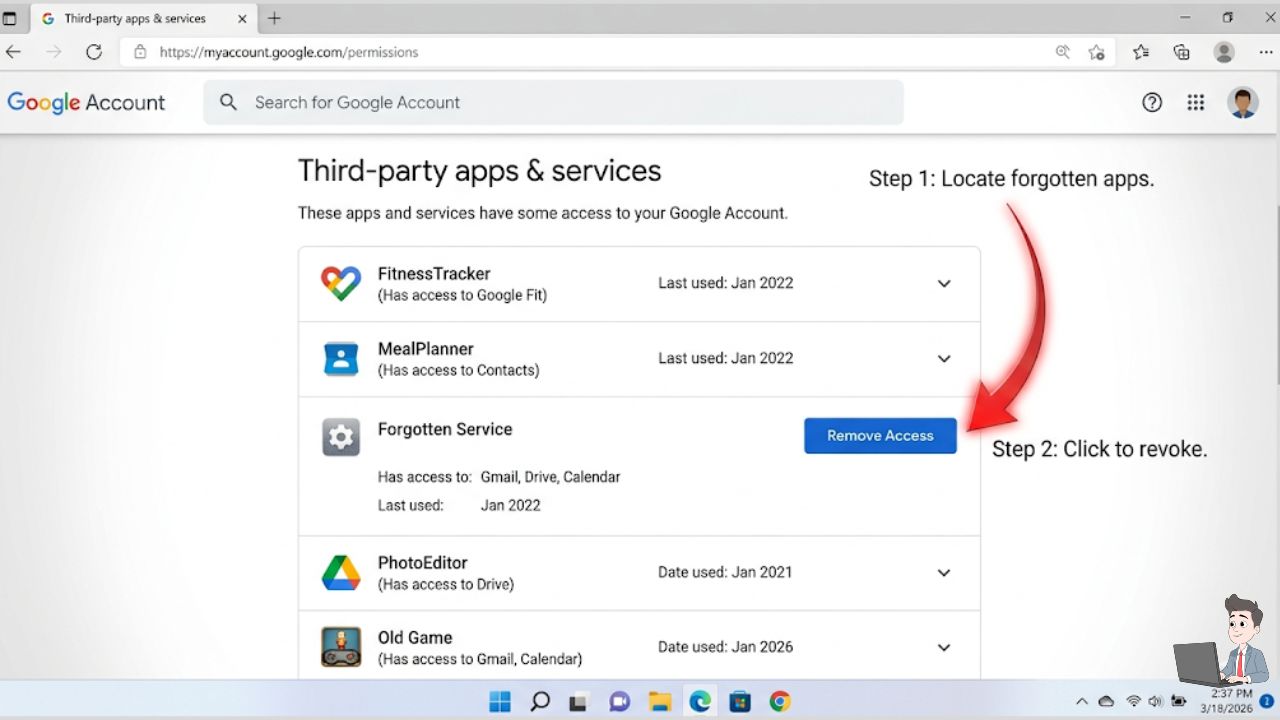
- Go to your Google Account dashboard.
- Navigate to Security > Your connections to third-party apps & services.
- The Purge: This screen reveals every single app you have ever granted access to. If you see a “Video Editor AI” from 2023, click on it, revoke its access, and then immediately check your bank statement to ensure they are no longer charging you.
Phase 3: Scaling the Audit with AI (For Growing Teams)
If you run a company with 15 or 50 employees, checking individual bank statements is impossible. This is where you need to integrate your workflows with modern, AI-driven expense platforms like Ramp or Brex.
| The Feature | How It Saves You Money |
| Automated Usage Tracking | The AI connects your expense platform to your Single Sign-On provider (like Okta). It cross-references billing data with login data. If you are paying for 10 Zoom seats but 4 haven’t hosted a meeting in 6 months, the system alerts you to downgrade them. |
| Redundancy Detection | The AI spots overlap. If it sees you paying invoices to both Mailchimp and HubSpot, it flags the 80% feature overlap and suggests consolidation. Stripping out redundant software is the fastest way to add a 20% margin back to your bottom line. |
Phase 4: The “Burner Card” Defense
We get stuck with Zombie Apps because SaaS companies use “Dark Patterns.” They make it a one-click signup but force you to navigate a maze of hidden menus and retention surveys to cancel.
I decided to stop playing their game. I no longer use my real corporate card for software trials.
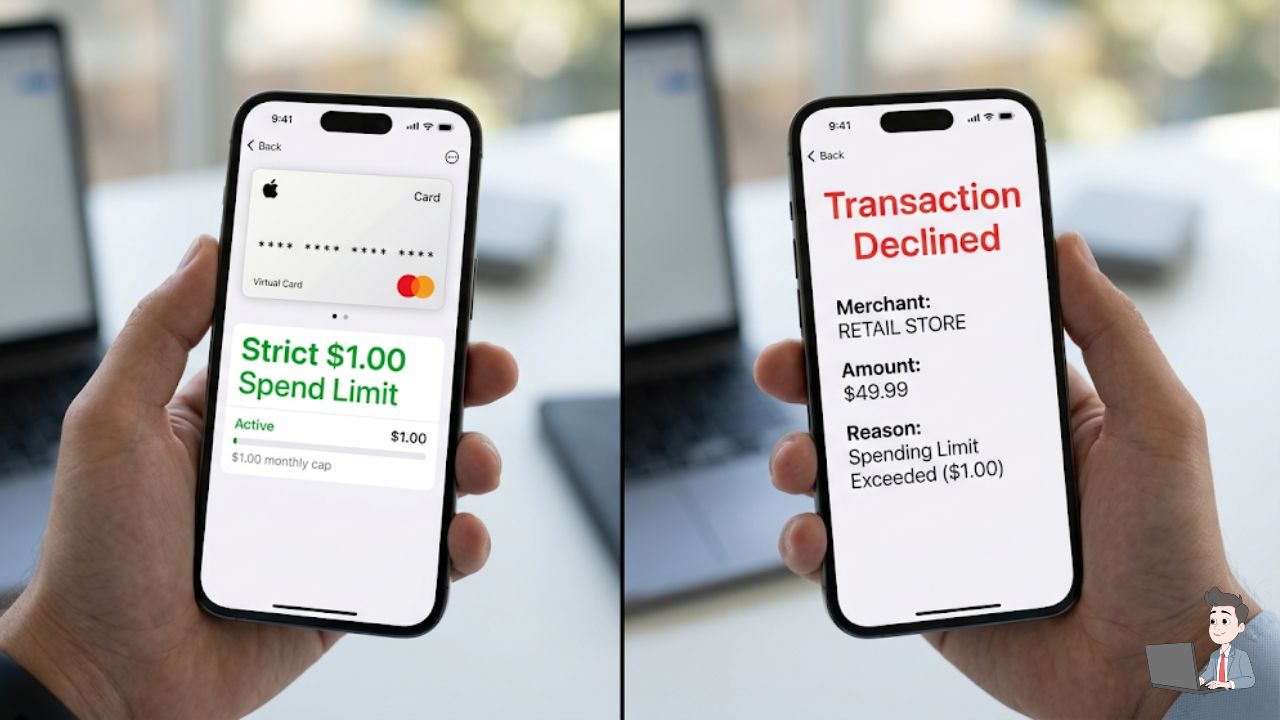
I use Privacy.com (or virtual card features inside my business banking portal). These tools let you generate a unique, temporary virtual credit card number for every vendor.
- The Strategy: When I want to test a new automation tool, I generate a virtual card and set the “Spend Limit” to exactly $1.00.
- The Result: I sign up for the 14-day free trial. If I forget to cancel, and they try to charge me $49.99 on day fifteen, the transaction simply declines. They email me saying my account is suspended, I smile, and move on. You hold all the power.
Phase 5: Train Your Own AI Forensic Accountant
If you don’t use a dedicated expense platform, you can build your own AI auditor using a secure LLM (like ChatGPT Plus, Gemini Advanced, or Claude).
Safety First: Never upload raw bank statements to a public AI. Open your CSV, delete columns with account numbers, routing details, and physical addresses. Keep only: Date, Merchant Description, and Amount.
Paste your anonymized data into the AI with this exact prompt:
The Subscription Hunter Prompt:
“Act as a Senior Forensic Accountant. I am pasting an anonymized CSV of my business bank transactions. Your goal is to identify all recurring subscription payments. Look for monthly patterns. Output a table with three columns: ‘Vendor Name’, ‘Monthly Cost’, and ‘Annualized Cost’. At the bottom of the table, calculate the Total Annual Waste if I were to cancel every single one of these today.”
The Negotiation Script
If the AI finds a tool you actually do use, but you realize you are paying too much, have the AI write your negotiation email:
“Act as a tough Procurement Manager. Write an email to the billing support team at [Software Name]. I have been a loyal customer for 3 years, but rarely use their ‘Pro’ features anymore. Tell them I am heavily considering cancelling to switch to a cheaper competitor. Ask them to apply a 20% loyalty discount to my account or downgrade me to a hidden ‘Legacy Plan’ to keep my business. Keep the tone highly professional but firm. Under 100 words.”
I have used a variation of this exact script to lower my CRM costs, internet bills, and hosting fees. It works about 60% of the time, and it takes five seconds to send.
The Bottom Line: Adopting a “Zero-Based” Tech Stack
The only way to cure the Zombie App problem permanently is to change your mindset. I operate on a Zero-Based Tech Budget.
Every December, I pretend my software budget is absolute zero. Every single application in my stack has to “fight” for its life to be added back into the budget for the new year. If an app cannot explicitly prove that it either saves my team significant time or directly generates revenue, it gets the axe.
Take two hours this weekend. Export that bank CSV. Run a quick script or check your Google OAuth connections. You might be surprised to find that you can give yourself a $2,000 raise this year just by clicking “Unsubscribe.”
Financial Disclaimer: This article is for educational purposes. Always anonymize sensitive financial data before using AI tools. Consult with a certified accountant or financial advisor before making sweeping changes to corporate expense policies.
About the Author:
Olivia is a digital entrepreneur and the founder of Profit Shield AI. She specializes in business process automation, custom Python workflows, and helping companies eliminate operational bloat.