
I’ll never forget the phone call I got from an agency owner a few years ago. He was practically hyperventilating.
His top sales manager—let’s call him Mike—had just resigned. Mike gave his two weeks’ notice, shook everyone’s hands, ate the farewell cake, and left to “pursue a new opportunity.”
Three weeks later, my friend’s biggest clients started dropping like flies. They were all moving over to a new competitor across town. Guess who was the new VP of Sales at that competitor? Yep. Mike.
Mike didn’t smash a window. He didn’t write a complex hacking script to break through a firewall.
On his second-to-last day, he simply plugged a $15 SanDisk USB drive into his company MacBook, copied the master CRM spreadsheet, and walked out the front door. He put the entire company’s future in his front pocket.
In the tech security world, we call this Insider Risk.
Business owners love to think that a Non-Disclosure Agreement (NDA) will protect them. Here is a hard truth: An NDA is just a piece of paper. It only helps you sue someone after the damage is already done, assuming you have the hundreds of thousands of dollars required for corporate litigation.
You don’t need a better lawyer. You need a better tech stack.
Here is my realistic, step-by-step blueprint for spotting “Exit Theft” before it happens, and the exact backend configurations I use at Profit Shield AI to stop data from walking out the door.
Phase 1: The Psychology of the “Slow Bleed”
Before we block the data, we have to understand the behavior.
When I audit security logs for companies, the data consistently shows that nearly 70% of intellectual property theft happens in the 90 days before the employee officially resigns.
It’s a slow bleed. And ironically, it’s rarely malicious.
Departing employees usually suffer from the “Ownership Delusion.” They think, “I spent two years building this client list. I designed these templates. They belong to me.”
Because they are a “Trusted Insider,” your standard firewall completely ignores them. Firewalls are built to stop external hackers from getting in. They are absolutely terrible at stopping a trusted account manager from pushing data out.
Phase 2: Plugging the 3 Ultimate “Exit Vectors”
You cannot stand behind your employees and physically watch their screens. You need an automated system that enforces your rules without you lifting a finger. This is called Endpoint Data Loss Prevention (DLP).
Here are the three ways employees take data, and exactly how to plug the holes today.
1. The USB Dump (And How to Kill It)
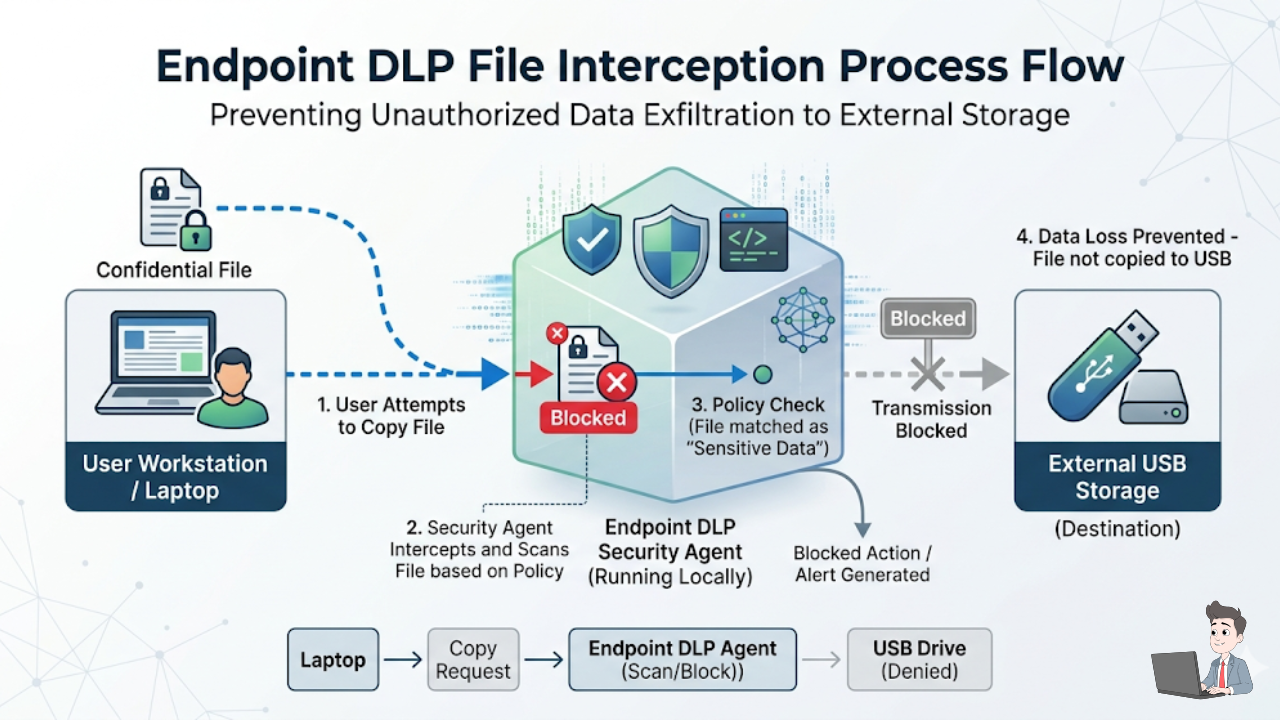
Plugging in a flash drive is the oldest trick in the book.
The Fix: Modern endpoint security agents live directly on the company laptops. You simply go into the admin dashboard and toggle “Device Control” to strictly block unauthorized storage. What Happens: When an employee plugs in a personal hard drive, the AI agent instantly kills the file transfer. The employee gets a polite popup saying: “Action Blocked: Unauthorized Storage Device.” The port is dead, and the data stays put.
2. The Personal Cloud Bypass
When employees realize the USB ports are blocked, they immediately pivot to the cloud. They open a browser, log into their personal Dropbox, and drag the files over.
The Fix: You need a Cloud Access Security Broker (CASB). It sounds complicated, but it’s just a traffic cop for web browsers. What Happens: The system inspects the URL. If the employee is uploading a spreadsheet to your official corporate cloud, it allows it. If they try to upload that same file to their personal Google Drive, the system intercepts and blocks the upload.
3. The “Silent Auto-Forward” (The Most Common Leak)
This one is infuriating because it is completely invisible. An employee doesn’t download anything. They just go into their work email settings and set up an “Auto-Forward” rule, sending every incoming email to their personal Gmail account.
The Fix: This doesn’t require extra software; you just have to flip a switch in your current email provider.
- For Google Workspace: Go to Admin Console > Apps > Google Workspace > Gmail > Routing. Disable “Automatic Forwarding to external addresses.”
- For Microsoft 365: Go to the Exchange Admin Center > Mail flow > Remote domains. Edit the default policy and uncheck “Allow automatic forwarding.”
That one toggle stops 50% of data theft overnight.
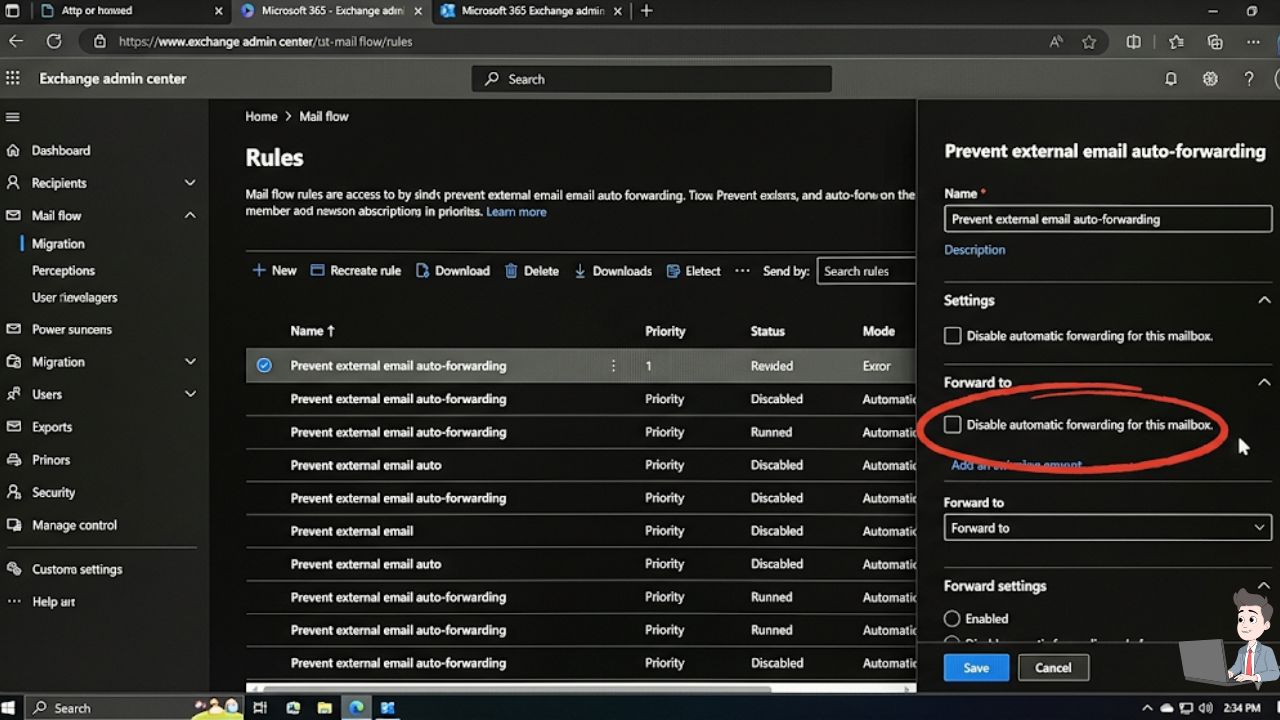
Watch this excellent, step-by-step breakdown on how to configure Microsoft 365 to automatically detect when a departing employee attempts to mass-download files or share them to external domains.
Phase 3: The “Zero-Trust” Offboarding Playbook
If you wait until the exit interview to secure your data, you have already lost. Here is the strict protocol I recommend when someone hands in their notice.
The “Garden Leave” Reality If a high-level employee resigns to join a direct competitor, you cannot let them work out their two weeks. It is standard corporate practice to invoke “Garden Leave.”
You say, “Thank you for your service. We are going to pay you for your two weeks, but today is your last day in the systems.” You cut their Slack, email, and CRM access while they are still sitting in the room with you.
Remote Wipe (The BYOD Nightmare) Do your employees check work emails on their personal iPhones? If so, you have a massive vulnerability called “Bring Your Own Device” (BYOD). If they quit, you can’t ask them to hand over their personal phone so you can delete the Outlook app.

The Tool: You must use Mobile Device Management (MDM) software. How it Works: It creates a secure, encrypted “work bubble” on their personal phone. When they quit, you click one button in your admin panel, and the MDM software remotely detonates the work bubble, deleting all company data without touching their personal photos.
The Bonus Strategy: Building Your Own AI Watchdog
What if you run a smaller agency and can’t afford a $100,000 enterprise security suite? You can actually use secure AI to audit your own logs and spot the warning signs manually.
(CRITICAL WARNING: Never paste real client names, sensitive data, or PII into a public AI tool. Only use secure, enterprise-grade AI environments and anonymize the logs first).
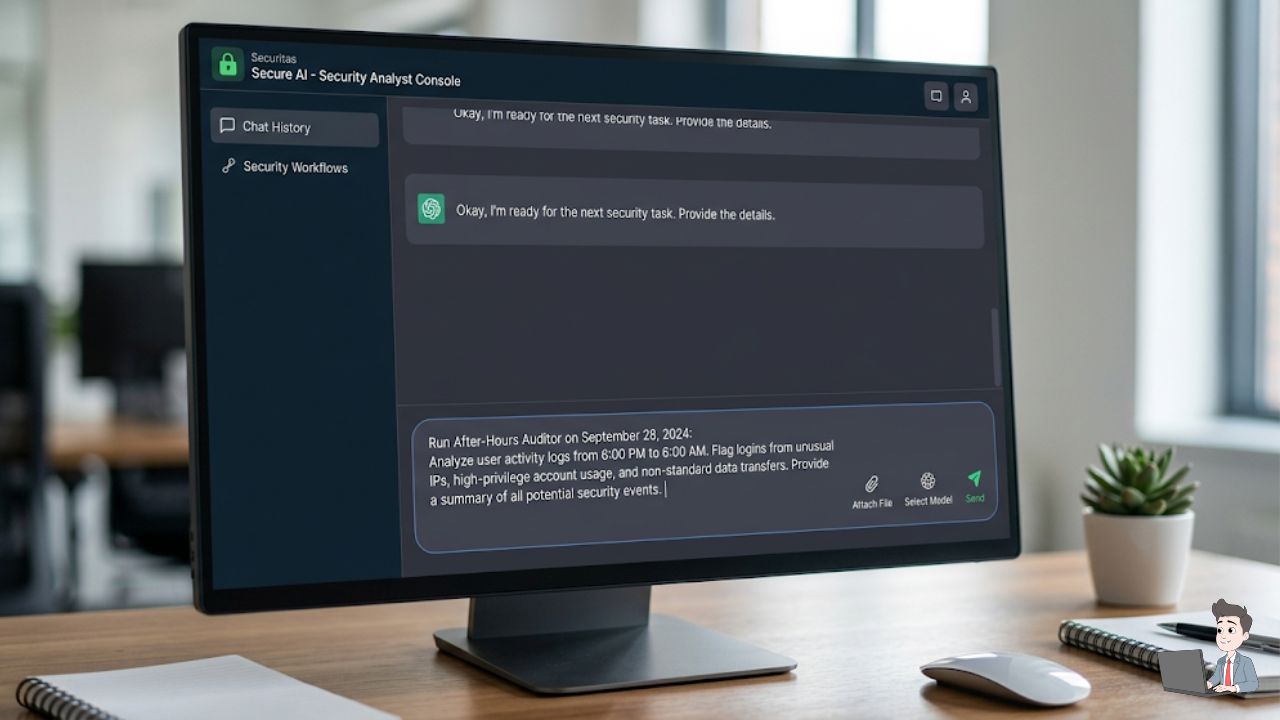
Export your basic file-access logs (just timestamps, file sizes, and user IDs), and feed them into your AI with this specific prompt to spot a flight risk:
The “After-Hours” Prompt: “You are a Cybersecurity Incident Responder. I am pasting an anonymized log of file downloads. Flag any ‘Temporal Anomalies.’ Specifically, point out any user downloading more than 50MB of data between Friday 6:00 PM and Monday 6:00 AM. Also, flag any user downloading more than 20 files in under 60 seconds, as this indicates automated scraping.”
Trust is Good. Verification is Better.
Whenever I implement these systems for a team, there is always one manager who says, “But we trust our employees! This feels like Big Brother.”
Here is how I reframe it: You aren’t doing this because you think your team are criminals. You are doing it to protect the livelihood of every other person in the building.
If one rogue account manager walks out with your client list and tanks the company’s revenue, everybody else loses their jobs. By letting the technology silently watch the data, you ensure that when an employee decides to say goodbye, they leave with nothing but their memories and a final paycheck.
Security Disclaimer: This article is for educational purposes and reflects the author’s personal experience with digital workflow security. Cybersecurity threats are constantly evolving. Always consult with a certified IT professional or legal counsel before implementing employee monitoring tools, as privacy laws (like GDPR or CCPA) dictate how and when you can monitor device usage.
About the Author: Olivia is an automation specialist and the founder of Profit Shield AI. She helps business owners secure their digital assets and automate their backend workflows to protect revenue and scale efficiently.